KODAK EASYSHARE DX3900 Zoom Digital Camera — User's Guide
Table of Contents > Customizing Picture-taking Settings > Setting the Picture Quality
3 Customizing Picture-taking Settings
Setting the Picture Quality
Use the Quality setting to select a picture resolution.

|
|
|
|
|
1.
Turn the Mode dial to Capture
 and press Menu. and press Menu. |
|||
|
2.
Highlight the Quality menu
 , then press Select. , then press Select. |
|||
|
3.
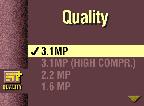
Highlight the Quality setting you want to use. 3.1 MP is the highest resolution, 0.8 MP is the lowest. See the table below for details.
|
||
|
4.
Press Select to accept the change and return to the Menu screen.
|
|||
|
5.
Press Menu to exit the Menu screen.
This setting remains until you change it. |
|||
Higher resolutions produce more detailed images and larger file sizes—great for photo-quality prints but take up more space on the Picture Card and may take longer to transmit by e-mail.
Lower resolutions produce less detailed images and smaller file sizes—they look great on-screen, take up less space on the Picture Card, and transmit quickly by e-mail.
See Picture Storage Capacities for how many pictures you can store on different Picture Cards.
| Quality Setting Name (in megapixels) | Resolution (in pixels) | File Size (approx.) |
|---|---|---|
|
3.1 MP (default) |
2160 x 1440 |
960 KB |
|
3.1 MP (High Compression) |
2160 x 1440 |
480 KB |
|
2.2 MP |
1800 x 1200 |
730 KB |
|
1.6 MP |
1536 x 1024 |
550 KB |
|
0.8 MP |
1080 x 720 |
325 KB |
|
0.8 MP (Burst) |
1080 x 720 |
325 KB (each picture in series) |
See Shooting a Burst Series of Pictures for how to use the 0.8 MP (Burst) setting.
Previous Next