KODAK EASYSHARE DX3700 Digital Camera — User's Guide
Table of Contents > Taking Pictures > Using the Digital Zoom
2 Taking Pictures
Using the Digital Zoom
This camera provides a 2X and 3X digital zoom.*

|
|
|
|
|
1.
Set the Mode selector to Capture
 . . |
||
|
2.
Press the
 button to turn Preview on. Use the LCD to frame your subject. button to turn Preview on. Use the LCD to frame your subject. |
|||
|
3.
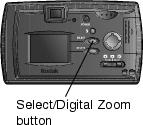
Press the Select/Digital Zoom button for 2X zoom. Press again for 3X zoom. Press again to return to 1X (no zoom).
The LCD displays the image and the magnification level. |
|||
|
4.
Take the picture.
|
|||
* You may notice a decrease in printed image quality when using digital zoom. See Resolution and Print Sizes
Previous Next