KODAK EASYSHARE DX3700 Digital Camera — User's Guide
Table of Contents > Reviewing Your Pictures > Viewing Pictures in the LCD
3 Reviewing Your Pictures
Viewing Pictures in the LCD

|
|
|
|
|
1.
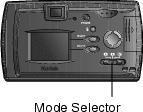
Slide the Mode selector to Review
 . . If a card is present, the camera accesses the card. If no card is present, the camera accesses internal memory. The camera displays the last picture taken. |
||
|
2.
Press the
 buttons to scroll forward or backward through the pictures. buttons to scroll forward or backward through the pictures. |
|||
|
3.
To exit Review mode, slide the Mode selector to Capture
 or Setup or Setup  . . |
|||
The icons displayed with the picture indicate the applied features:
|
|
|
|
|
Print order |
Frame number |
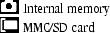
Picture Location |


|
|
|
|
|
|
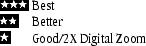
Quality |
Full battery |
Low battery |
Exhausted battery |


Previous Next