KODAK EASYSHARE DX4900 Zoom Digital Camera — User's Guide
Table of Contents > Getting Started > Checking the Batteries
1 Getting Started
Checking the Batteries
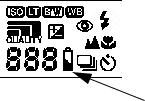
Check the battery power level in the Status Display before you begin taking pictures. Don't miss an important picture because the camera batteries are low or exhausted.

|
|
|
|
||
|
1.
Turn on the camera.
|
||||
|
2.
Check the battery symbol that appears in the Status Display. If no symbol appears, your battery is fully charged.
|
|||||
 —batteries soon need to be replaced or recharged.
 —batteries are too weak to power the camera. Replace or recharge the batteries.
For guidelines on battery usage, see Using Your Batteries.
Previous Next