Kodak EasyShare LS633 zoom digital camera — User's Guide
Table of Contents > Getting Started > Turning On the Camera
1 Getting Started
Turning On the Camera

|
|
|
|
|
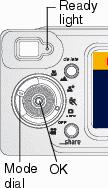
Rotate the Mode dial from Off to any other position. The Ready light blinks while the camera performs a self-check, then glows green when the camera is ready to take pictures (or videos, if the mode dial is set to  ). ).
In Still and Video modes, status icons appear on the camera screen. |
||
Adjusting the Display
|
If you want to |
Then do this |
|
Turn the camera screen on or off |
|
|
Change the Liveview setting so that it is automatically on or off whenever the camera is on |
|
|
Redisplay the status icons after they turn off |
Press |
|
Turn off the camera |
Turn the Mode dial to Off. The camera completes operations that are in process. |
 .
. Previous Next