Kodak EasyShare LS633 zoom digital camera — User's Guide
Table of Contents > Taking Pictures > Using the Flash
2 Taking Pictures
Using the Flash
Use the flash when you take pictures at night, indoors, or outdoors in heavy shadows. The flash setting can be changed in any Still mode; the default flash setting is restored when you exit the mode or turn off the camera.
Flash Range
-
Wide Angle: 2 to 11.2 ft (0.6 to 3.4 m) at ISO 140
-
Telephoto: 2 to 6.6 ft (0.6 to 2.0 m) at ISO 140
Turning On the Flash

|
|
|
|
|
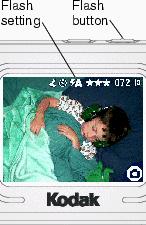
Press the  button repeatedly to scroll through the flash options. button repeatedly to scroll through the flash options. |
||
The flash icon that is displayed in the camera screen status area (Checking Camera Status Area) is the active option.
|
|||
 Auto Flash—flash fires when the lighting conditions require it.
  Off—flash never fires.
  Fill—flash fires every time you take a picture, regardless of the lighting conditions.
  Red-eye—flash fires once so the subject's eyes become accustomed to the flash, then fires again when the picture is taken. (If the lighting conditions require flash but do not require Red-eye reduction, the flash may fire only once.)
 Flash Settings In Each Mode
|
Icon |
Mode |
Default Flash Setting |
Available Flash Settings |
Camera Returns to the Default Flash Setting |
|
|
Auto |
Auto or Red-eye |
Auto, Flash Off, Fill Flash, Red-eye |
When you exit the mode or turn off the camera |
|
|
Sport |
Auto |
||
|
|
Night |
Auto or Red-eye |
||
|
|
Landscape |
Off |
||
|
|
Close-up |
Off |
||
|
|
Video |
Off |
None |
Flash cannot be turned on |


Other Flash Screen Information
|
|
|
|
|
|
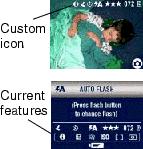
When the Custom  icon appears in the status area, press the Flash button to determine your custom settings. icon appears in the status area, press the Flash button to determine your custom settings. The camera screen displays the features that are currently set. |
||
Previous Next