Kodak EasyShare CX6200 digital camera — User's Guide
Table of Contents > Customizing Your Camera Settings > Setting Video Out
6 Customizing Your Camera Settings
Setting Video Out
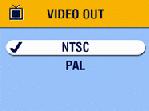
Video Out is a regional setting that lets you connect your camera to a television or other external device using an optional Kodak EasyShare printer dock 6000 and an audio/video cable (see Displaying Pictures/Videos on a Television).

|
|
|
|
||||
|
1.
Press the Menu button.
|
|||||||
|
2.
Press
 to highlight Setup Menu to highlight Setup Menu  , then press the OK button. , then press the OK button. |
|||||||
|
3.
Highlight the Video Out icon
 , then press the OK button. , then press the OK button. |
|||||||
|
4.
Highlight an option, then press the OK button:
|
||||||
|
5.
Press the Menu button to exit the menu.
This setting remains until you change it. |
|||||||
Previous Next