Kodak EasyShare CX6200 digital camera — User's Guide
Table of Contents > Customizing Your Camera Settings > Formatting Internal Memory or SD/MMC Card
6 Customizing Your Camera Settings
Formatting Internal Memory or SD/MMC Card

|
CAUTION: Formatting erases all pictures and videos, including those that are protected. Removing a card during formatting may damage the card. |

|
|
|
|
||||
|
1.
Press the Menu button.
|
|||||||
|
2.
Press
 to highlight Setup Menu to highlight Setup Menu  , then press the OK button. , then press the OK button. |
|||||||
|
3.
Highlight Format
 , then press the OK button. , then press the OK button. |
|||||||
|
4.
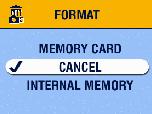
Highlight an option, then press the OK button:
|
||||||
|
5.
Highlight Continue Format, then press the OK button.
When the formatting is complete, the Setup menu appears. |
|||||||
Previous Next