Kodak EasyShare DX6440 zoom digital camera — User's Guide
Table of Contents > Taking Pictures > Resetting PAS Settings to Defaults
2 Taking Pictures
Resetting PAS Settings to Defaults
Reset is available in PAS mode only; it returns all settings to the original factory defaults. Reset does not change settings for any mode except PAS. See Changing Optional Settings for a list of the settings.

|
|
|
|
|
1.
In any Still mode, press the Menu button.
|
|||
|
2.
Move the joystick
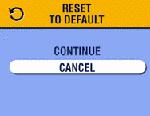
 to highlight Reset to highlight Reset  , then press the OK button. , then press the OK button. |
|||
|
3.
Move the joystick
 to highlight an option, then press the OK button. to highlight an option, then press the OK button.
|
||
|
4.
Press the Menu button to exit the menu.
|
|||
See Original Factory Settings for a list of the original factory settings.
Previous Next