Kodak EasyShare LS743 zoom digital camera — User's guide
Table of Contents > Getting started > Storing pictures and videos on an SD/MMC card
1 Getting started
Storing pictures and videos on an SD/MMC card
Your camera has 16 MB of internal memory. You can purchase optional SD/MMC cards for removable, reusable storage for your pictures and videos.

|
CAUTION: Insert card as shown. Do not force it; doing so may damage the camera or card. Do not insert or remove a card when the green ready light is blinking; doing so may damage your pictures, card, or camera. |

|
|
|
|
|
To insert an SD/MMC card: | ||
|
1.
Turn off the camera and open the card door.
|
|||
|
2.
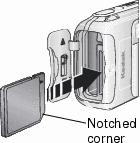
Orient the card as shown on the camera body.
|
|||
|
3.
Push the card into the slot to seat the connector and close the card door.
|
|||
|
4.
To remove the card, turn off the camera. Push the card in, then release it. When the card is partially ejected, pull it out.
|
|||
| NOTE: | When using a card for the first time, we suggest you format it before you take pictures (). |
See Storage capacities for storage capacities. Purchase SD/MMC cards at a dealer of Kodak products or www.kodak.com/go/ls743accessories
Previous Next