Kodak EasyShare LS743 zoom digital camera — User's guide
Table of Contents > Taking pictures and videos > Taking a video
2 Taking pictures and videos
Taking a video

|
|
|
|
|
1.
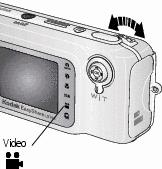
Rotate the jog dial to highlight Video
 . Press the jog dial. . Press the jog dial. |
||
|
2.
Use the viewfinder or camera screen to frame your subject.
|
|||
|
3.
Press the Shutter button completely down and release. To stop recording, press and release the Shutter button again.
|
|||
Previous Next