Kodak EasyShare CX7220 zoom digital camera — User's Guide
Table of Contents > Transferring and printing pictures > Transferring pictures and videos with the USB cable
6 Transferring and printing pictures
Transferring pictures and videos with the USB cable

|
|
|
|
|
1.
Turn off the camera.
|
|||
|
2.
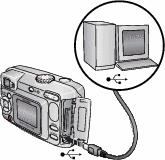
Plug the labeled
 end of the USB cable into the labeled USB port on your computer. See your computer user's guide for details. end of the USB cable into the labeled USB port on your computer. See your computer user's guide for details. |
||
|
3.
Plug the other end of the USB cable into the labeled USB port on the camera.
|
|||
|
4.
Turn on the camera.
Kodak EasyShare software opens on your computer. The software prompts you through the transfer process. |
|||
| NOTE: | For a tutorial on connecting, see the Kodak EasyShare software CD, or visit www.kodak.com/go/howto.You can also use a Kodak multi-card reader or Kodak SD multimedia card reader-writer to transfer your pictures. |
Previous Next