Kodak EasyShare printer dock — User's Guide
Table of Contents > Preparing your EasyShare digital camera > Setting the picture quality
2 Preparing your EasyShare digital camera
Setting the picture quality

|
|
|
|
|
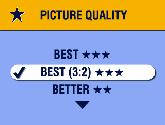
Before taking pictures, change the Picture Quality setting on your Kodak EasyShare camera to Best (3:2)
 . This ensures that the pictures you take are proportional to the printer dock photo paper, preventing unwanted cropping of your pictures. . This ensures that the pictures you take are proportional to the printer dock photo paper, preventing unwanted cropping of your pictures. See your camera user's guide for more information. |
||
Previous Next