Kodak EasyShare CX6445 zoom digital camera — User's Guide
Table of Contents > Taking Pictures > Setting White Balance
2 Taking Pictures
Setting White Balance
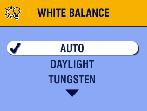
Whites can look white in daylight, but different under other lighting conditions. Use White Balance to correct the color shifts that result from shooting pictures under different light sources.
| NOTE: | White Balance is available in Landscape and Close-up modes. |

|
|
|
|
|
1.
In any Still mode, press the Menu button.
|
|||
|
2.
Press
 to highlight White Balance to highlight White Balance  , then press the OK button. , then press the OK button. |
|||
|
3.
Press
 to highlight an option, then press the OK button. to highlight an option, then press the OK button.
|
||
|
4.
Press the Menu button to exit the menu.
This setting remains until you change the Mode dial or turn off the camera. |
|||
Previous Next