Kodak EasyShare CX6445 zoom digital camera — User's Guide
Table of Contents > Taking Pictures > Setting Focus Zone
2 Taking Pictures
Setting Focus Zone
If you do not get the composition and focus results you want by using framing marks (Using the Auto Focus Framing Marks), use the Focus Zone feature to select a large or a concentrated area of focus.
| NOTE: | Focus Zone is available in Close-up mode. |

|
|
|
|
|
1.
In any Still mode, press the Menu button.
|
|||
|
2.
Press
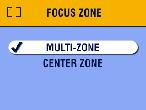
 to highlight Focus Zone to highlight Focus Zone  , then press the OK button. , then press the OK button. |
|||
|
3.
Press
 to highlight an option, then press the OK button. to highlight an option, then press the OK button.
|
||
|
4.
Press the Menu button to exit the menu.
This setting remains until you change the Mode dial or turn off the camera. |
|||
Previous Next