Kodak EasyShare CX6445 zoom digital camera — User's Guide
Table of Contents > Reviewing Pictures and Videos > Magnifying Pictures
4 Reviewing Pictures and Videos
Magnifying Pictures

|
|
|
|
||
|
1.
Press the Review button, then locate a picture.
|
|||||
|
2.
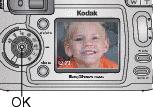
To magnify at 2X, press the OK button. To magnify at 4X, press the OK button again.
The picture is magnified and the magnification value is displayed. The captured picture is not changed. |
||||
|
3.
Press

 to see different parts of the picture. to see different parts of the picture. |
|||||
|
4.
Press the OK button to redisplay the picture at the 1X (original) size.
|
|||||
|
5.
Press
 to locate a different picture, or press the Review button to exit Review mode. to locate a different picture, or press the Review button to exit Review mode. |
|||||
 , then press the OK button.
Previous Next