Kodak EasyShare V603 zoom digital camera — User's guide
Table of Contents > Working with pictures/videos > Viewing pictures/videos in different ways
3 Working with pictures/videos
Viewing pictures/videos in different ways
Viewing as thumbnails (multi-up)

|
|
|
|

|
1.
Press the Review button.
|
||
|
2.
Press
 view multi-up thumbnails. view multi-up thumbnails. |
|||
|
3.
Press

 to highlight a thumbnail. to highlight a thumbnail.
|
|||
Viewing by date or by album
|
|
|
|
|
|
1.
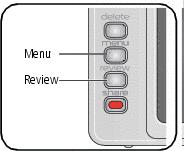
Press the Review button, then the Menu button.
|
||
|
2.
Press
 to highlight View By, then press the OK button. to highlight View By, then press the OK button. |
|||
|
3.
Press
 to highlight All (default), Date, or Album, then press the OK button. For more about albums, see Tagging pictures/videos for albums. to highlight All (default), Date, or Album, then press the OK button. For more about albums, see Tagging pictures/videos for albums.
|
|||
Viewing picture/video information
|
|
|
|
|

|
1.
Press the Review button.
|
||
|
2.
Repeatedly press the LCD/Info
 button to turn on/off status icons, histogram, and picture/video info. button to turn on/off status icons, histogram, and picture/video info.
|
|||
Previous Next