Kodak EasyShare photo printer 350 — User's Guide
Table of Contents > Getting started > Loading paper into the tray
1 Getting started
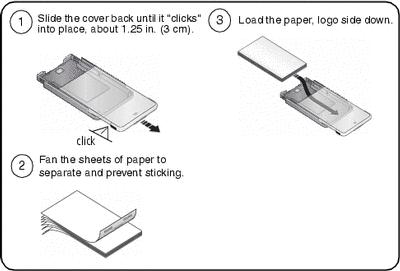
Loading paper into the tray
| IMPORTANT: | Use only the PH series Kodak color cartridge & photo paper kit for this printer. Do not use inkjet paper. Purchase Kodak photo paper kits at a retailer of Kodak products, or visit www.kodak.com/go/accessories. |

| IMPORTANT: | Do not load more than 25 sheets of paper (see fill line,  , inside tray). Load paper with perforated tabs only. To avoid fingerprints, do not touch the glossy side of the paper (Handling and storing the paper). , inside tray). Load paper with perforated tabs only. To avoid fingerprints, do not touch the glossy side of the paper (Handling and storing the paper). |
Previous Next