Kodak EasyShare G610 printer dock — User's guide
Table of Contents > Getting started > Loading the cartridge and paper
1 Getting started
Loading the cartridge and paper
| IMPORTANT: | Use only Kodak color cartridge & photo paper kits with the  symbol. Do not use inkjet paper. Reload a new cartridge or more paper when prompted on your docked camera or computer screen. (Kodak color cartridge & photo paper kits are sold separately at a retailer of Kodak products, or visit www.kodak.com/go/accessories.) symbol. Do not use inkjet paper. Reload a new cartridge or more paper when prompted on your docked camera or computer screen. (Kodak color cartridge & photo paper kits are sold separately at a retailer of Kodak products, or visit www.kodak.com/go/accessories.)
|
Cartridge:
See Handling and storing the cartridge on Cartridge.
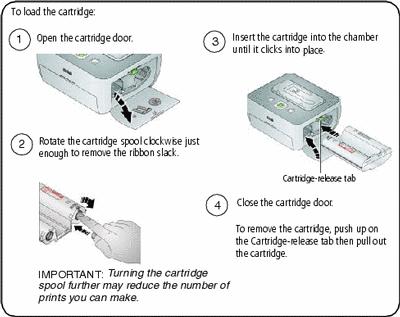
| IMPORTANT: |
The cartridge may lock if there is a paper error. Clear the paper error (
 ) before you remove the cartridge.
|
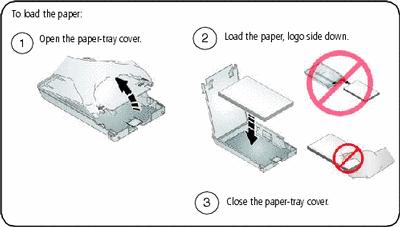
Paper:
| IMPORTANT: | Do not fill the paper tray above the paper-limit line,  , inside the paper tray (maximum 30 sheets). To avoid fingerprints, do not touch the glossy side of the paper (see Paper). , inside the paper tray (maximum 30 sheets). To avoid fingerprints, do not touch the glossy side of the paper (see Paper). |
Previous Next