Kodak EasyShare digital photo frame — P520/P720/P820
Table of Contents > Viewing pictures > Deleting pictures
2 Viewing pictures
Deleting pictures

|
CAUTION: Removing a card or disconnecting a device while deleting may damage your card, pictures, or device. |

|
|
|
|
|
1.
Highlight a picture to delete: In thumbnails view, slide or tap below the slider arrows to find a picture; or, display a picture in single view (see Viewing a single picture).
To select multiple pictures, Selecting multiple pictures. |
||
|
2.
Tap
 (Actions). (Actions). |
|||
|
3.
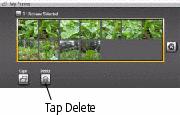
Tap
 (Delete), then tap Yes to confirm. (Delete), then tap Yes to confirm. The picture is deleted. |
|||
|
4.
Tap
 (Close) to close the menu. (Close) to close the menu. |
|||
Previous Next