KODAK EASYSHARE M340 Digital Camera — Extended user guide
Table of Contents > Taking pictures/videos > Taking focused pictures
2 Taking pictures/videos
Taking focused pictures

|
|
|
|

|
To get clear, focused pictures: | ||
|
1.
Turn the Mode dial to Smart Capture
 . Then press the Power button to turn on the camera. . Then press the Power button to turn on the camera. |
|||
|
2.
Compose the picture.
|
|||
|
3.
Press the Shutter button halfway to focus and set exposure. When the framing marks turn green, press the Shutter button completely down.
|
|||
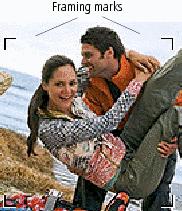
Using the framing marks
Framing marks indicate the camera focus area. In Smart Capture mode (and in SCN modes designed for pictures of people), the camera attempts to focus on faces.
|
|
|
|
|
|
1.
Press the Shutter button halfway.
If the camera is not focusing on the desired subject, release the Shutter button and recompose the scene. |
||
|
2.
Press the Shutter button
completely down
to take the picture.
|
|||
| NOTE: | Framing marks do not appear in all modes. Multiple framing marks may appear when faces are detected. When you press the Shutter button halfway down, the framing marks attempt to follow the main subject. |
Reviewing the picture/video just taken
After you take a picture/video, the LCD briefly displays a quickview. (To exit the quickview sooner, press the Shutter button halfway.)
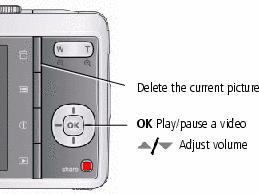
To review pictures/videos anytime, see Reviewing pictures/videos.
Previous Next