KODAK EASYSHARE Digital Frames — P730/P730m/P736
Table of Contents > Getting started > Inserting a memory card
1 Getting started
Inserting a memory card

|
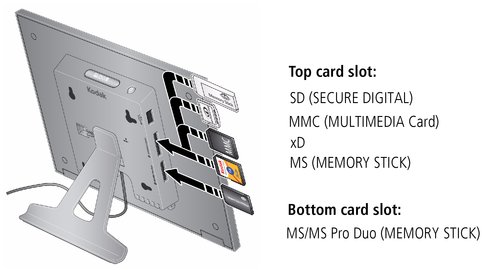
CAUTION: Do not insert an MS Pro Duo card in the top slot. It could get stuck and damage the card or your frame. |
-
To insert a card, push it firmly into the slot until it clicks and stops
-
To remove a card, pull it out of the slot.
Previous Next