KODAK EASYSHARE Digital Frame — D830/D1030
Table of Contents > Viewing pictures > Viewing your pictures
2 Viewing pictures
Viewing your pictures
View your pictures from the frame's internal memory or any connected picture source.

|
|
|
|
|
1.
Tap
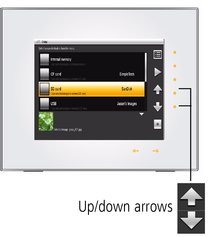
 (Menu), then tap (Menu), then tap  (Pictures). (Pictures). All connected sources and internal memory are listed. |
||
|
2.
Tap an up/down arrow
 to highlight a picture source, then: to highlight a picture source, then:
|
|||
 (Play) to start a slide show of the pictures in the highlighted source.
 |
Picture sources: |
|
|
|
Default play location—appears when you save a picture source as your automatic go-to location (Saving a default play location). |
|
|
Internal memory—the frame's 512 MB internal memory. Copy your pictures into internal memory from a memory card or other device (Copying on your frame). |
|
|
Memory card—appears when you insert a card (Inserting a memory card). The label and icon indicate the type of card. |
|
|
USB drive—appears when you insert a USB flash or other type drive (Connecting a USB device). |


Playback information
-
-
When Shuffle is on (the default setting,
 ), pictures play in random order.
 -
When Shuffle is off, pictures play according to your Display Picture Order By setting,
. The default is Old to new.
-
-
You can change the duration (how long each picture stays on the screen) and transition style between pictures. See Changing frame settings.
-
Pictures play continuously until you turn off the frame or change modes.
Previous Next