KODAK EASYSHARE C140 Digital Camera — Extended user guide
Table of Contents > Taking pictures/videos > Using the flash
2 Taking pictures/videos
Using the flash

|
|
|
|
|
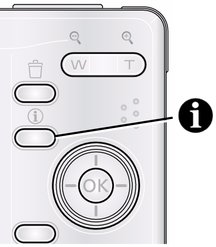
1.
Press the Info
 button to show shortcuts. button to show shortcuts. |
||
|
2.
Press
 to highlight the Flash icon on the LCD. Press to highlight the Flash icon on the LCD. Press  to choose a Flash mode. to choose a Flash mode.
|
|||
 to choose a Flash mode when shortcuts are not visible.
|
Flash modes |
Flash fires |
|
|
Auto |
|
When the lighting conditions require it. |
|
Fill (Flash On) |
|
Every time you take a picture, regardless of the lighting conditions. Use when the subject is in shadow or is "backlit" (when the light is behind the subject). In low light, hold the camera steady or use a tripod. |
|
Red Eye To turn the red eye feature on/off, see Using the Setup tab. |
|
If Red-eye Pre-flash is turned off, the flash fires once and the camera automatically corrects red-eye in the picture. |
|
|
If Red-eye Pre-flash is turned on, the flash fires once so the eyes become accustomed to the flash, then fires again when the picture is taken. |
|
|
Off |
|
|


Previous Next