KODAK EASYSHARE M550 Digital Camera — User guide
Table of Contents > Do more with your camera > Use the flash
1 Do more with your camera
Use the flash

|
|
|
|
|
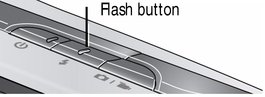
Press the Flash button repeatedly until the LCD displays the desired flash mode. |
||
|
Flash modes |
Flash fires |
|||
|
Auto |
|
When the lighting conditions require it. |
||
|
Fill (Flash On) |
|
Every time you take a picture, regardless of the lighting conditions. Use when the subject is in shadow or is "backlit" (when the light is behind the subject).
|
||
|
Red-eye Reduction Choose a setting in the Setup menu. |
|
A preflash fires, shrinking the eye pupil, before the picture is taken. |
||
|
Digital Correction |
A preflash does not fire; the camera corrects red eye.
|
|||
|
Off |
|
Never |
||


 Preflash

Previous Next