KODAK EASYSHARE Z981 Digital Camera — User guide
Table of Contents > Do more with your camera > Take a video
1 Do more with your camera
Take a video

|
|
|
|
|
1.
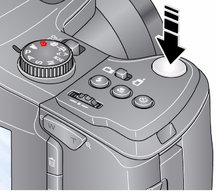
Turn the Mode dial to Video

|
||
|
2.
Press the Shutter button completely down, then release it. To stop recording, press and release the Shutter button again.
|
|||
Use Scene (SCN) modes
Choose a Scene mode—for great pictures in any situation.
-
Turn the Mode dial to SCN.
-
Press

 to choose a mode and read its description.
 -
Press OK (or let the description turn off) to enter the chosen Scene mode.
To read a mode description after it has turned off, press OK.
SCN modes: High ISO, Night Portrait, Landscape, Night Landscape, Flower, Sunset, Backlight, Candle light, Manner/Museum, Text, Beach, Snow, Fireworks, Children, Self-Portrait, and Stage.
|
See the Extended user guide |
Previous Next