KODAK EASYSHARE Digital Frame — P750/P850
Table of Contents > Changing settings and more > Changing frame settings
3 Changing settings and more
Changing frame settings
The options in the Settings menu let you customize and configure your frame.
| IMPORTANT: | You may need to keep pressing the up/down arrows  to see the complete list of available options. to see the complete list of available options. |

|
|
|
|
|
1.
While a slide show is playing, press OK to pause play and display the main control panel icons.
|
|||
|
2.
Press
 to highlight to highlight  (Settings), then press OK. (Settings), then press OK. |
|||
|
3.
Press
 to highlight a Setting, then press OK to display that setting's options. to highlight a Setting, then press OK to display that setting's options. |
|||
|
4.
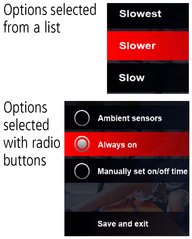
If the options are displayed in a list (no radio buttons), press
 to highlight an option, then press OK. to highlight an option, then press OK. |
||
|
5.
If the options are selected with radio buttons, highlight your choice, then highlight Save and exit and press OK.
|
|||
Previous Next