KODAK EASYSHARE Digital Frame — P750/P850
Table of Contents > Changing settings and more > Setting the time, date, and on/off times
3 Changing settings and more
Setting the time, date, and on/off times
The first time you turn on your frame, the Time, Date, and On/Off screens each appear automatically after you select your language (Setting the time, date, and on/off times).
To change the settings after your frame is set up and running:
-
Press OK to pause a slideshow and display the control panel icons.
-
Highlight
 (Settings), then press OK.
| NOTE: | Press arrow buttons  to highlight options and change settings. to highlight options and change settings. |
Set the time

|
|
|
|
|
1.
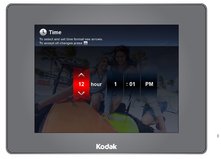
Highlight Time, then press OK.
|
||
|
2.
Press
 to change time format (12:00 or 24:00 hour clock), hour, minutes and AM/PM. to change time format (12:00 or 24:00 hour clock), hour, minutes and AM/PM. |
|||
|
3.
Press
 to move to the next entry. to move to the next entry. |
|||
|
4.
Press OK.
The Date screen appears. |
|||
Set the date
|
|
|
|
|
|
1.
Press
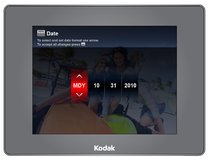
 to change the date format, month, day, and year. to change the date format, month, day, and year. |
||
|
2.
Press
 to move to the next entry. to move to the next entry. |
|||
|
3.
Press OK.
The On/Off Times screen appears. |
|||
Set on/off times
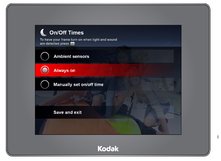
Highlight the option you want, then press OK to activate it.
Only one option can be active at a time. For example, if the activity sensors are on and you select Manually set on/off times, the activity sensors are deselected.
|
|
|
|
|
|
Activity sensors (default)—energy saver, frame turns on when it detects light (artificial and daylight) or sound, turns off when the room is dark and quiet. | ||
| Always on—frame stays on until you press the power button or unplug it. | |||
| Manually set on/off time—frame turns itself on and off at the times you specify. See Manually set auto on/off times, below. | |||
Manually set auto on/off times
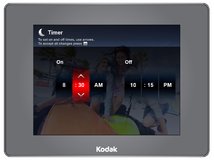
You specify the times you want your frame to automatically turn on and off.
|
|
|
|
|
|
1.
Press
 to change hour, minutes and AM/PM. to change hour, minutes and AM/PM. |
||
|
2.
Press
 to move to the next entry. to move to the next entry. |
|||
|
3.
Press OK when finished.
|
|||
Previous Next