KODAK EASYSHARE MD30 Digital Camera — User guide
Table of Contents > Do more with your camera > Use the optical zoom
1 Do more with your camera
Use the optical zoom

|
|
|
|
|
1.
Use the LCD to frame your subject.
|
||
|
2.
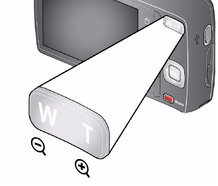
To zoom in, press Telephoto (T). To zoom out, press Wide Angle (W).
|
|||
|
3.
Take the picture.
|
|||
Previous Next