KODAK ESP C110 All-in-One Printer — User's Manual
Table of Contents > Copying > Copying a photograph
4 Copying
Copying a photograph
You can copy a photograph using the default settings, or you can adjust the quantity, size, quality, and brightness of your copies.
Using the default settings to copy a photograph
The default settings are either the factory default settings (see Resetting factory defaults), or defaults that you have set on the printer (see ).
To copy a photograph using the current default settings:
-
Load photo paper into the printer (see Loading photo paper ).
-
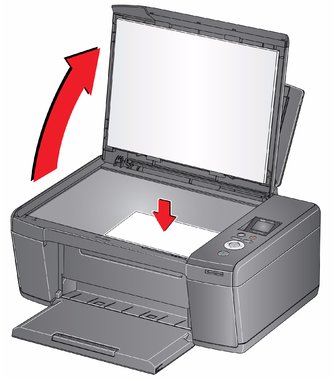
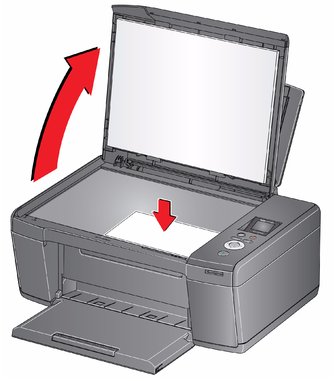
Lift the scanner lid, and place the photograph face down in the right-front corner of the scanner glass.
-
Close the lid.
-
Press Home.
-
Press
 to select Copy Photo.
 -
Press Start to begin copying.
Adjusting the settings and copying a photograph
To copy a photograph using settings other than the default settings:
-
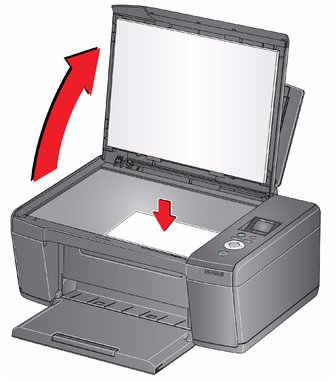
Lift the scanner lid, and place the photograph face down in the right-front corner of the scanner glass.
-
Close the lid.
-
Press Home.
-
Press
 to select Copy Photo, then press OK.
 -
Press
 to select an option, then press
  or
or  to change the setting.
Changing the number of copies of a photograph
To change the number of copies:
-
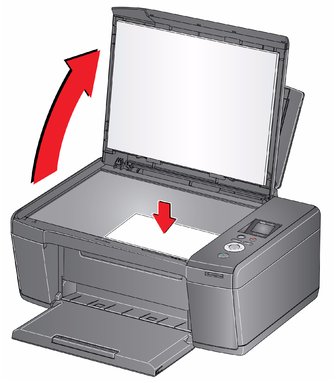
Lift the scanner lid, and place the photograph face down in the right-front corner of the scanner glass.
-
Close the lid.
-
Press Home.
-
Press
 to select Copy Photo, then press OK.
 -
Make sure Quantity is selected.
-
Press
 or
or  to select a number.
 -
Press Start to begin copying.
Enlarging or reducing a photograph
To enlarge or reduce the size of the copy:
-
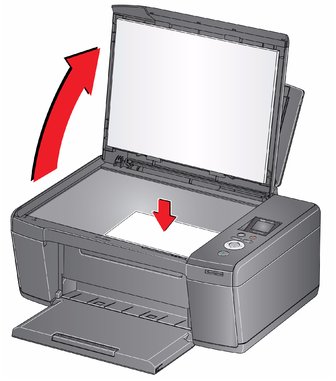
Lift the scanner lid, and place the photograph face down in the right-front corner of the scanner glass.
-
Close the lid.
-
Press Home.
-
Press
 to select Copy Photo, then press OK.
 -
Press
 to select Copy Size.
 -
Press
 or
or  to select the copy size.
 -
Press Start to begin copying.
Darkening or lightening a photograph
To darken or lighten the copy:
-
Lift the scanner lid, and place the photograph face down in the right-front corner of the scanner glass.
-
Close the lid.
-
Press Home.
-
Press
 to select Copy Photo, then press OK.
 -
Press
 to select Brightness.
 -
Press
 to select a number below zero for a darker copy, or press
  to select a number above zero for a lighter copy.
Previous Next