KODAK EASYSHARE Camera / C15 — Extended user guide
Table of Contents > Taking pictures/videos > Using the digital zoom
2 Taking pictures/videos
Using the digital zoom

|
|
|
|
||
|
1.
Use the LCD to frame your subject.
|
||||
|
2.
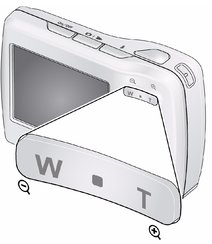
To zoom in, press Telephoto (T).
To zoom out, press Wide Angle (W). |
|||||
|
3.
Take the picture or video.
|
|||||
| NOTE: | You may notice decreased image quality when using digital zoom. |
Previous Next