KODAK PLAYFULL Waterproof Video Camera / Ze2 — User guide
Table of Contents > Solving camera problems > Resetting the camera
4 Solving camera problems
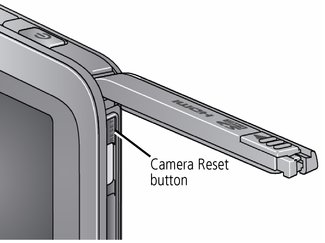
Resetting the camera
If the camera will not turn off, use a straightened paper clip, pen, or stylus tip to gently but firmly press the button for about 1 second. The camera turns off. When you turn on the camera again, you may need to reset the Date and Time.
Go to www.kodak.com/go/Ze2support for the Extended user guide, firmware updates, and answers to your questions.
| Status | Solution |
|---|---|
|
Low battery.
|
|
|
Card or internal memory is nearly full. |
|
|
Corrupt or unusable card. |
|
|
Unrecognized file. |
|
|
LCD is hard to see. |
|
|
Camera will not turn on. |
|
|
Videos are blurry. |
|
|
Videos are choppy or jumpy when played on a computer. |
|
|
Videos do not play on a TV. |
|
|
Solve problems with ARCSOFT Software. |
|

Previous Next