KODAK EASYSHARE DX3215 Zoom Digital Camera — User's Guide
Table of Contents > Getting Started > Inserting an Optional MMC/SD Card
1 Getting Started
Inserting an Optional MMC/SD Card

|
|
|
|
|
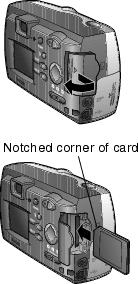
To insert a card: | ||
|
1.
Turn the camera off.
|
|||
|
2.
Open the card door.
|
|||
|
3.
Orient the card as shown.
|
|||
|
4.
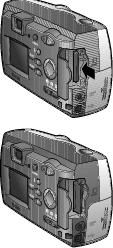
Push the card into the slot to seat the connector. Close the door.
|
|||

Use only certified cards that carry the MultiMedia or Secure Digital logo. See Picture Storage Capacities for storage capacities.
Previous Next