KODAK PALMPIX Camera for the PALM m500 Handheld Series — User's Guide
Table of Contents > KODAK PALMPIX Camera Software > Installing the Software
2 KODAK PALMPIX Camera Software
Installing the Software
-
On your computer, exit all software programs.
-
Place the KODAK PALMPIX Camera CD into the CD-ROM drive.
If the CD does not start automatically:
On a PC—from the Start menu, select Run. In the text box, enter the CD drive letter:\setup.exe. For example, d:\setup.exe.
On a MACINTOSH COMPUTER—click the PALMPIX desktop icon and open Installer.
-
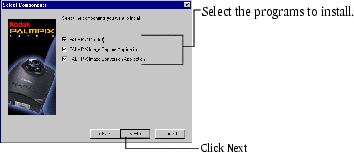
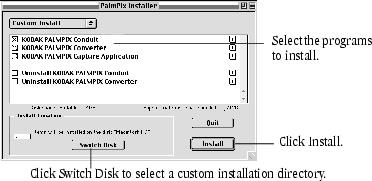
Select your language (if asked), then follow the on-screen instructions to install the software.
On a PC:
On a MACINTOSH Computer:
-
Select your PALM Handheld user name (if asked) when prompted.
NOTE: If multiple PALM Handheld users share your computer, install the KODAK PALMPIX Software separately for each user, selecting the appropriate user name when prompted.
-
After the software is installed on the computer, perform a HOTSYNC operation to transfer the PALMPIX Software onto the PALM Handheld.
NOTE: If you have difficulty installing the PALMPIX Image Capture Application on your PALM Handheld, refer to the guides that came with your PALM Handheld for instructions on installing applications manually.
Previous Next