KODAK PALMPIX Camera for the PALM m500 Handheld Series — User's Guide
Table of Contents > Using Your PALMPIX Camera > Connecting the Camera
3 Using Your PALMPIX Camera
Connecting the Camera
For the camera to work, it must be connected to a PALM m500 Handheld series that has the PALMPIX Image Capture Application installed. When the camera is connected, the lens faces away from the back of the PALM Handheld.

|
|
|
|
|
1.
Flip open the camera.
|
||
|
2.
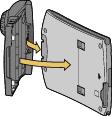
Fit the connector end of the camera over the PALM Handheld connector and press to seat the connectors.
|
|||
|
3.
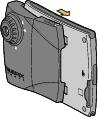
Push the camera latches forward and fit the camera tabs into the indents in the PALM Handheld.
|
||
Previous Next