KODAK PALMPIX Camera for the PALM m500 Handheld Series — User's Guide
Table of Contents > Using Your PALMPIX Camera > Releasing the Camera
3 Using Your PALMPIX Camera
Releasing the Camera

|
|
|
|
|
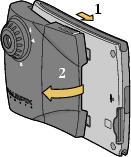
1.
Slide the camera latches forward to release the camera tabs from the detents in the PALM Handheld.
|
||
|
2.
Rotate the camera cover away from the handheld until it disconnects.
|
|||

|
CAUTION: Do not remove the camera during a picture transfer. Doing so may cause you to lose picture data or information. |
Previous Next