KODAK PALMPIX Camera for the PALM m500 Handheld Series — User's Guide
Table of Contents > Using Your PALMPIX Camera > Photographing a Business Card
3 Using Your PALMPIX Camera
Photographing a Business Card
Keep track of all those business cards you received by photographing them and storing them on your PALM Handheld.
Follow these steps for a sharp picture of a business card (2 x 3.5 inches, 5 x 9 cm).

|
|
|
|
|
1.
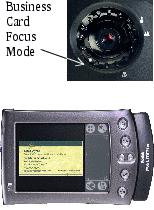
Set the lens to the business card focus mode. (From the Portrait position, turn the lens counterclockwise to the second click.)
|
||
|
2.
Click the Preview/Shutter (Date Book) button once to turn on the Preview mode.
|
|||
|
3.
Position the camera so that the business card image fills the viewer with a slight space to the left and right.
|
|||
|
4.
Keep the view finder parallel to the business card and press the Preview/Shutter (Date Book) button again to take the picture.
|
|||
Previous Next