KODAK PALMPIX Camera for the PALM m500 Handheld Series — User's Guide
Table of Contents > Using Your PALMPIX Camera > Taking Close-Up Pictures
3 Using Your PALMPIX Camera
Taking Close-Up Pictures
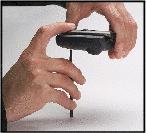
For the sharpest close-up pictures, position your camera 4 inches (10 cm) away from the subject. To make sure that you're exactly 4 inches (10 cm) away, use your PALM Stylus.

|
|
|
|
|
1.
Connect the camera to the PALM Handheld, then tap the Applications button.

|
||
|
2.
Tap the PALMPIX icon.

|
|||
|
3.
Set the focus to the Macro setting.

|
|||
|
4.
Place the tip of the stylus in the indentation at the bottom of the camera away from the lens.
|
|||
|
5.
Rest the other end of the stylus on a surface next to your subject.
|
|||
|
6.
Press the Preview/Shutter (Date Book) button once to display a live preview of your subject on the screen.
|
|||
|
7.
Hold the PALM Handheld steady and press the Preview/Shutter (Date Book) button again to take the picture.
|
|||
Previous Next