KODAK PALMPIX Camera for the PALM m500 Handheld Series — User's Guide
Table of Contents > Working With Your Pictures > Selecting and Viewing Pictures
4 Working With Your Pictures
Selecting and Viewing Pictures
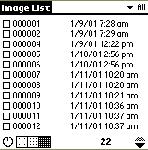
When you start the PALMPIX Image Capture Application, the Image List appears. The Image List contains all the pictures that are stored on the handheld. For each picture, the name plus the date and time the picture was taken appear.

|
|
|
|
|
To select one or more pictures, tap the box in front of the name. A check appears in the box. Tap the box again to remove the check and deselect the picture. To select all the pictures, tap  ®Select all. To deselect all the pictures, tap
  ®Deselect all.
 To navigate through the pictures, tap the Scroll button up or down. 
|
||
|
|
|
|
|
|
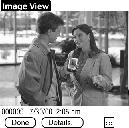
To view a picture, tap the name of the picture you want to view. The picture appears in Image View with the name, the date and time the picture was taken, and the picture resolution. |
||
| NOTE: | Pictures beamed from non-color to color handhelds appear as grayscale images on the color handheld. |
Previous Next