KODAK PALMPIX Camera for the PALM m500 Handheld Series — User's Guide
Table of Contents > Working With Your Pictures > Renaming Pictures
4 Working With Your Pictures
Renaming Pictures

|
|
|
|
|
1.
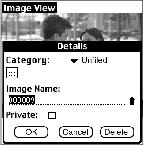
With the picture displayed, tap Details.
|
||
|
2.
In the Details window, rename the file.
You can also categorize, delete, and mark the file as private. For more information, refer to the guides that came with the PALM Handheld. |
|||
|
3.
Tap OK on the Details window. Tap Done on the Image View window to return to the Image List.
|
|||
Previous Next