KODAK PALMPIX Camera for the PALM m500 Handheld Series — User's Guide
Table of Contents > Working With Your Pictures > Converting Images on Your Handheld
4 Working With Your Pictures
Converting Images on Your Handheld
If the picture was taken at good (320 x 240) or better resolution (640 x 480) and an expansion card is available, you can convert PALMPIX images to JPEG on your handheld.

|
|
|
|
|
1.
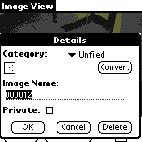
With the image displayed, tap Details.
If the Convert option is not available, the image is not the correct resolution for conversion. |
||
|
2.
Tap Convert.
The picture is converted and stored on the expansion card in the Pictures Folder. |
|||
|
3.
Tap OK on the Details screen. Tap Done on the Image View screen to return to the main Image List screen.
|
|||
Previous Next