KODAK PALMPIX Camera for the PALM m500 Handheld Series — User's Guide
Table of Contents > Working With an Expansion Card > Storing Pictures on an Expansion Card
5 Working With an Expansion Card
Storing Pictures on an Expansion Card
Pictures moved or copied using the following procedure are stored in PPX format on the card. You will store most pictures this way.

|
|
|
|
|
1.
Insert the MMC/SD card into the PALM Handheld. See the back of the handheld for how to insert the card correctly.
|
||
|
2.
From the Image List tap the image's checkbox to select the image.
|
|||
|
3.
Tap
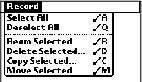
 ®Record®Copy Selected or Move Selected.
A graphic appears to show that each picture is being copied or moved. |
|||
Previous Next