KODAK PALMPIX Camera for the PALM m500 Handheld Series — User's Guide
Table of Contents > Working With an Expansion Card > Viewing Pictures on a Card
5 Working With an Expansion Card
Viewing Pictures on a Card

|
|
|
|
|
1.
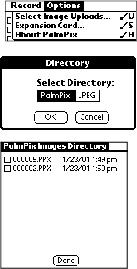
With the Image List displayed, tap
 ®Options ®Expansion Card.
 The Directory window appears. |
||
|
2.
Tap Palmpix or JPEG. Tap OK to view the list.
The card list of PPX or JPEG pictures appears. Unlike the Image List, it contains all the PPX or JPEG pictures stored on the card, displaying the name, date and time when the image was copied or moved. |
|||
|
3.
Tap the up or down scroll buttons to navigate through the list.
|
|||
|
4.
Tap the name of the picture that you want to view.
|
|||
Previous Next