KODAK PALMPIX Camera for the PALM m500 Handheld Series — User's Guide
Table of Contents > Working With an Expansion Card > Using a Computer to Access Pictures on the Card
5 Working With an Expansion Card
Using a Computer to Access Pictures on the Card
If you have an MMC/SD card reader , you can view, transfer or convert pictures that are stored on the memory card on your computer.
You must install the KODAK PALMPIX Image Conversion Application on your computer before you can view the pictures. You then use the Image Conversion Application to convert your pictures to a viewable format (JPEG, BMP, or PICT).
Converting PPX Pictures on a PC
-
With the MMC/SD card reader connected to your PC, insert the card into the card reader slot.
-
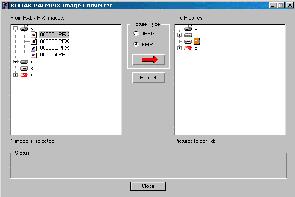
On the PC, launch the Image Conversion Application.
The main screen appears.
-
Select the pictures to convert and view, then select the desired format (JPEG or BMP).
-
In the right pane, select the folder in which to store the pictures.
-
Click the right arrow button to start the conversion.
Messages appear during conversion.
-
Click OK when the Completed Successfully message appears.
Converting PPX Pictures on a MACINTOSH Computer
-
With the MMC/SC card reader connected to your computer, insert the expansion card into the card reader slot.
-
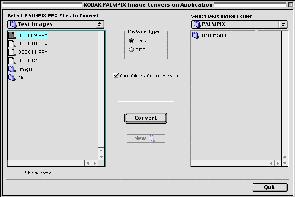
On the MACINTOSH Computer, launch the Image Conversion Application.
The PalmPix Converter window appears.
-
In the left pane, navigate to and open the PALMPIX folder on the memory card.
-
Select the pictures to convert and view, then select the desired format (JPEG or PICT).
-
In the right pane, select the folder in which to store the pictures.
The name of the selected folder appears above the right pane.
-
If desired, check the Open folder after conversion.
-
Click Convert to start the conversion.
Messages appear during conversion.
-
Click OK when the Completed Successfully message appears.
Accessing JPEG Card Images with Your Computer
When the MMC/SD card is inserted into the card reader, your computer views the card as it would any other storage device. So if there are JPEG images on the MMC/SD card, you can move, copy, delete, or open them from your computer as you would any other file.
Transferring Images from Computer to Card
With the card reader attached to your computer, you can copy or move JPEG images from your computer onto the card.
| NOTE: | JPEG images created on digital devices other than the PALMPIX camera might not be viewable on the handheld. |
Previous Next