KODAK EASYSHARE DX3700 Digital Camera — User's Guide
Table of Contents > Taking Pictures > Previewing Your Picture on the LCD
2 Taking Pictures
Previewing Your Picture on the LCD
When the Preview feature is on, you can use the LCD as a viewfinder.
| NOTE: | Preview is required when you are using the Digital Zoom (Using the Digital Zoom) feature. |

|
|
|
|
|
To turn Preview on: | ||
|
1.
Slide the Mode selector to Capture
 . . |
|||
|
2.
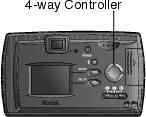
Press the
 button on the 4-way controller. button on the 4-way controller. The LCD displays a live image and the status bar. |
|||
|
3.
Center your subject in the LCD, and press the Shutter button halfway down to set the exposure and focus. Press the Shutter button completely down to take the picture.
|
|||
|
4.
To turn Preview off, press the
 button. button. |
|||
Previous Next