KODAK EASYSHARE DX4900 Zoom Digital Camera — User's Guide
Table of Contents > Getting Started > Setting the Clock
1 Getting Started
Setting the Clock
The camera has a built-in clock that maintains the date and time in a 24-hour format. If the battery is removed from the camera for an extended period of time, or is exhausted, you may need to reset the clock.
| NOTE: | It is important to set the correct date and time if you want to imprint the date on your pictures (Placing the Date on Pictures). |

|
|
|
|
|
1.
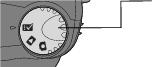
With the camera turned on, turn the Mode dial to Setup
 . . |
||
|
2.
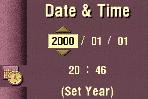
Highlight the Date & Time
 menu, then press Select. menu, then press Select. |
|||
|
3.
Press the
 arrow buttons to move through the fields. Press the arrow buttons to move through the fields. Press the  arrow buttons to adjust the date and time settings. arrow buttons to adjust the date and time settings. |
||
|
4.
Press Select to accept the changes.
|
|||
Previous Next