KODAK EASYSHARE DX4900 Zoom Digital Camera — User's Guide
Table of Contents > Getting Started > Navigating Through the Menus
1 Getting Started
Navigating Through the Menus
The method of moving through the menus and selecting options is the same in all three camera modes.

|
|
|
|
|
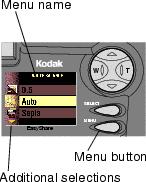
To display the menus on the LCD screen: | ||
|
|||
|
|||
 , and Review
  modes, press the Menu button.
  mode, the menus are automatically displayed when you turn the Mode dial to Setup.
 |
|
|
|
|
|
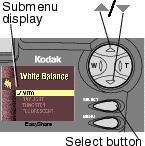
To navigate and select the menus and options: | ||
|
1.
Use the
 arrow buttons to scroll through the menus and submenu options. arrow buttons to scroll through the menus and submenu options. |
|||
|
2.
Press the Select button to display the submenus for the highlighted menu and to accept a highlighted submenu option.
|
|||
|
3.
In Capture and Review modes, press the Menu button to turn off the menus.
|
|||
Previous Next