KODAK EASYSHARE DX4900 Zoom Digital Camera — User's Guide
Table of Contents > Personalizing Your Camera > Selecting a Language
6 Personalizing Your Camera
Selecting a Language
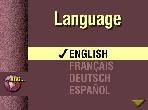
The Language feature allows you to display the menus and screen messages in different languages.
| NOTE: | In certain countries, the language menu is not available. These cameras must be operated only in the language installed at the factory. |

|
|
|
|
|
1.
Turn the Mode dial to Setup
 . . |
||
|
2.
Highlight the Language menu
 , then press Select. , then press Select. |
|||
|
3.
Highlight the Language setting you want to use.
|
|||
|
4.
Press Select.
This setting remains until you change it. |
|||
Previous Next