KODAK EASYSHARE DX4900 Zoom Digital Camera — User's Guide
Table of Contents > Personalizing Your Camera > Formatting a COMPACTFLASH Card
6 Personalizing Your Camera
Formatting a COMPACTFLASH Card
You may need to format a card if it becomes corrupted. When this happens, an error message appears on the LCD screen. See for error messages.

|
|
|
|
||||
|
1.
Turn the Mode dial to Setup
 . . |
|||||||
|
2.
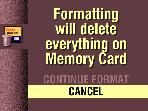
Highlight the Format Card menu
 , then press Select. , then press Select. |
|||||||
|
3.
Highlight the Format Card setting you want to use.
|
||||||
|
4.
Press Select.
|
|||||||

|
CAUTION: Formatting erases everything, even protected pictures, from the card. Removing the card during formatting may damage the card. |
Previous Next