Kodak EasyShare LS633 zoom digital camera — User's Guide
Table of Contents > Taking Pictures > Landscape Mode
2 Taking Pictures
Landscape Mode
Use this mode to capture distant subjects, such as landscape scenes.

|
|
|
|
|
1.
Turn the Mode dial to
 . . The camera screen displays a mode description. To interrupt the description, press  . .
|
||
|
2.
Press the Shutter button
half-way and hold
to set the exposure.
|
|||
|
3.
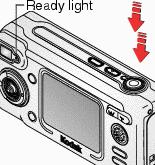
When the Ready light glows green, press the Shutter button
the rest of the way down
to take the picture.
The Ready light blinks green while the picture is saved. |
|||
|
Default flash setting: |
Off |
|
Available flash settings: |
Auto, Flash Off, Fill Flash, Red-eye |
|
Camera returns to default: |
When you change modes or turn off the camera. |
Previous Next